
Back Up Your Microsoft 365 Data with Acronis
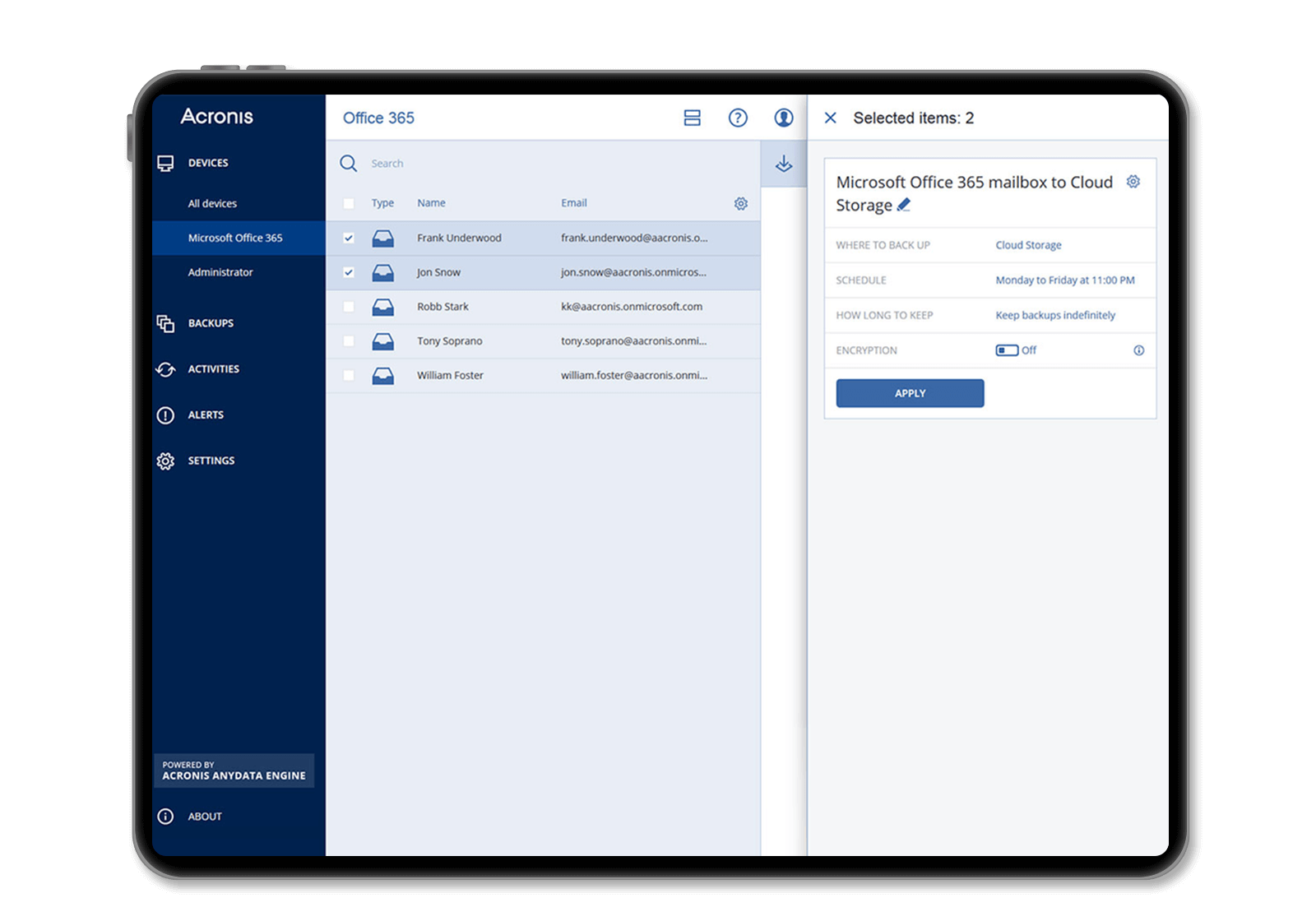
Microsoft 365 offers powerful collaboration services. However, Microsoft doesn’t take responsibility for customer data. Microsoft recommends users back up their content and data regularly using third-party services. This responsibility is yours. Without third-party backup, sensitive business data like emails or shared files stored in Microsoft 365 aren’t protected from common data loss issues.
Why Protecting Microsoft 365 Data and Applications is Crucial
Did you know 85% of organizations using Microsoft 365 have experienced email data breaches? You should consider implementing a comprehensive data protection solution. This includes backup-recovery, cybersecurity, and endpoint protection management.
- With over 400 million active users monthly, Microsoft 365 is the preferred productivity solution for many organizations.
- Without third-party backup, sensitive business data faces data loss risks, such as accidental deletions and malware attacks.
- Microsoft reported 1,220 new common vulnerabilities and exposures (CVEs); attacks on Teams continue to rise.
Back Up Your Microsoft 365 Data with Acronis
Microsoft 365 offers powerful collaboration services. However, Microsoft doesn’t take responsibility for customer data. Microsoft recommends users back up their content and data regularly using third-party services. This responsibility is yours.
Without third-party backup, sensitive business data like emails or shared files stored in Microsoft 365 aren’t protected from common data loss issues.
Scanning Microsoft 365 Backups for Malware
Acronis performs heuristic-based malware scanning. It detects and removes malware in Microsoft 365 backup archives.
This prevents a scenario where malware infects a resource in Microsoft Exchange or a Microsoft 365 app. It stops the malware from being copied to backup archives and reintegrated into the production Microsoft 365 environment during recovery. This native integration of data protection and cybersecurity eliminates malware samples from Microsoft 365 backups before they reinfect live systems.
Why Choose Acronis?
Acronis provides best-in-class, cloud-to-cloud, agentless backup and recovery. It includes free cloud storage for Microsoft 365.

Benefit from Agentless Backup
Ensure your clients’ Microsoft 365 data is backed up and recoverable. Use best-in-class, cloud-to-cloud agentless backup and recovery technologies.

Address Security Vulnerabilities
Monitor all Microsoft products for vulnerabilities. In addition, quickly patch them with automated patch management prioritized by vulnerability severity.

Protect Data, Enhance Compliance
Ensure critical Microsoft 365 data is backed up and recoverable. Enhance compliance with legal and regulatory requirements.
Key Features for Protecting Your Microsoft 365 Data

One Solution for Every Workload
Save on licensing, training, and integration. Acronis Cyber Protect Cloud is a scalable solution. It protects customer data across 20+ platforms: physical, virtual, cloud, or mobile.

Fast, Detailed Recovery
Prevent downtime and ensure business continuity by recovering your clients’ data in seconds. Back up and restore specific data pieces like emails, files, sites, contacts, and attachments in detail.

Automatic Protection for New Microsoft 365 Items
Simplify backup management for Microsoft 365 and reduce headaches. Automatically protect new users, groups, and sites.

Fast Backup Search
Find the file you need in seconds. Advanced search for mailboxes allows searching by email subject, recipient, sender, or date. Also, search using Word forms or partial information. Search site items and file names in Teams, OneDrive for Business, and SharePoint Online.

Powerful Status Monitoring
Achieve higher transparency and security levels with backup status monitoring. It includes advanced reporting capabilities, widgets, notifications, and alerts for critical events.

Group Management
Update and apply specific policies for large groups, up to hundreds of users, without doing it individually.

All-Inclusive Pricing
Low and predictable costs make budgeting easier. It includes software and free cloud storage.

Automatic Maintenance
Acronis takes on ongoing maintenance, ensuring your protection is always up-to-date and secure.
